Beginning Cake PHP
CakePHP
CakePHP is a free, open-source, rapid development framework for PHP.
It’s a foundational structure for programmers to create web
applications. CakePHP goal is to enable developers to work in a
structured and rapid manner–without loss of flexibility. CakePHP takes
the monotony out of web development.
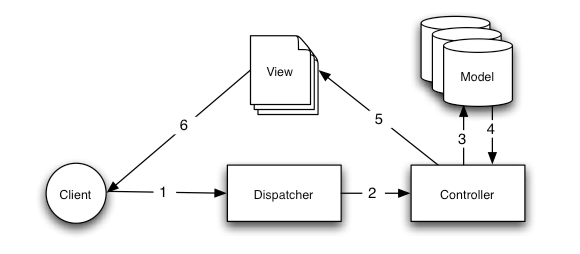
MVC in CakePHP
Model view controller (MVC) is an architectural pattern used in software engineering.
Model: Database functions exist in the model
View: Design parts written here
Controller: Business Logic goes here
Database related functions
Security.salt and Security.cipherSeed in cakephp
- The Security.salt is used for generating hashes.we can change the default Security.salt value in /app/Config/core.php.
- The Security.cipherseed is used for encrypt/decrypt strings.We can
change the default Security.cipherSeed value by editing
/app/Config/core.php.
afterSave
First file that gets loaded when you run a application
bootstrap.php
yes it can be changed.Either through index.php , or through .htaccess
Naming convention
Table names are plural and lowercased
model names are singular and
CamelCased: ModelName, model filenames are singular and underscored:
model_name.php,
controller names are plural and CamelCased with
*Controller* appended: ControllerNamesController, controller filenames
are plural and underscored with *controller* appended:
controller_names_controller.php,
Models
Models are the classes that form the business layer in your application.
They should be responsible for managing almost everything
regarding your data, its validity, and its interactions, as well as the evolution
of the information workflow in your domain.
More on models
Behavior
Behaviors in CakePHP are associated with Models.
Behaviors are used to change the way models behaves and enforcing model to act as something else.
Containable
Containable behavior
Containable
Containable behavior
Relationship Types
The four association types in CakePHP are: hasOne, hasMany, belongsTo, and hasAndBelongsToMany (HABTM).| Relationship | Association Type | Example |
|---|---|---|
| one to one | hasOne | A user has one profile. |
| one to many | hasMany | A user can have multiple recipes. |
| many to one | belongsTo | Many recipes belong to a user. |
| many to many | hasAndBelongsToMany | Recipes have, and belong to, many ingredients. |
Model Callcacks
beforeFind
beforeFind(array $query) :: Called before any find-related operation. The $query passed
to this callback contains information about the current query:
conditions, fields, etc.
afterFind
afterFind(array $results, boolean $primary = false) ::Use this callback to modify results that have been returned from a
find operation, or to perform any other post-find logic. The
$results parameter passed to this callback contains the returned
results from the model’s find operation
beforeValidate
beforeValidate(array $options = array()) :: Use this callback to modify model data before it is validated, or to modify validation rules if required. This function must also return true, otherwise the current save() execution will abort.
beforeValidate(array $options = array()) :: Use this callback to modify model data before it is validated, or to modify validation rules if required. This function must also return true, otherwise the current save() execution will abort.
afterValidate
afterValidate() :: Called after data has been checked for errors. Use this callback to perform any data cleanup or preparation if needed.
afterValidate() :: Called after data has been checked for errors. Use this callback to perform any data cleanup or preparation if needed.
beforeSave
beforeSave(array $options = array()) :: Place any pre-save logic in this function. This function executes
immediately after model data has been successfully validated, but
just before the data is saved. This function should also return
true if you want the save operation to continue.
This callback is especially handy for any data-massaging logic that
needs to happen before your data is stored. If your storage engine
needs dates in a specific format, access it at $this->data and
modify it.
afterSave
afterSave(boolean $created, array $options = array()) :: If you have logic you need to be executed just after every save
operation, place it in this callback method. The saved data will
be available in $this->data.
The value of $created will be true if a new record was created (rather than an update).
The $options array is the same one passed to Model::save().
The value of $created will be true if a new record was created (rather than an update).
The $options array is the same one passed to Model::save().
beforeDelete
beforeDelete(boolean $cascade = true) :: Place any pre-deletion logic in this function. This function should
return true if you want the deletion to continue, and false if you
want to abort.
afterDelete
afterDelete() :: Place any logic that you want to be executed after every deletion in this callback method.
afterDelete() :: Place any logic that you want to be executed after every deletion in this callback method.
// perhaps after deleting a record from the database, you also want to delete
// an associated file
public function afterDelete() {
$file = new File($this->data['SomeModel']['file_path']);
$file->delete();
}
onError
onError() :: Called if any problems occur.Controller
A controller is used to manage the logic for a part of your application.
Most commonly, controllers are used to manage the logic for a single
model. Controllers can include any number of methods which are usually
referred to as actions. Actions are controller methods used to display
views. An action is a single method of a controller.
default function in controller is index() function
Callbacks
- Main call back functions are,
Controller::beforeFilter()
This function is executed before
every action in the controller. It’s a handy place to check for an
active session or inspect user permissions.
- Controller::beforeRender()
- Called after controller action logic, but before the view is rendered. This callback is not used often, but may be needed if you are calling render() manually before the end of a given action.
- Controller::afterFilter()
- Called after every controller action, and after rendering is complete. This is the last controller method to run.
The render() method is automatically called at the end of each
requested controller action. This method performs all the view
logic (using the data you’ve submitted using the set() method),
places the view inside its $layout, and serves it back to the end
user.
- Example:
// ...
public function search() {
// Render the view in /View/Recipes/search.ctp $this->render();
}
// ...
}
Flow Control
redirect(mixed $url, integer $status, boolean $exit)$this->redirect(array('controller' => 'orders', 'action' => 'thanks'));
$this->redirect('/orders/thanks'); $this->redirect('http://www.example.com');
$this->redirect(array('action' => 'edit', $id));
$this->redirect($this->referer());
$this->redirect(array( 'controller' => 'orders', 'action' => 'confirm', 'product' => 'pizza', 'quantity' => 5) );
O/P http://www.example.com/orders/confirm/product:pizza/quantity:5
$this->redirect(array( 'controller' => 'orders', 'action' => 'confirm', '?' => array( 'product' => 'pizza', 'quantity' => 5 ), '#' => 'top') );
O/P http://www.example.com/orders/confirm?product=pizza&quantity=5#top
flash(string $message, string|array $url, integer $pause, string $layout)
method is different in that it shows a message before passing t
he user on to another URL.
Accessing request parameters
$this->request->controller; $this->request['controller'];
$this->request->params['controller'];
// Passed arguments
$this->request->pass;
$this->request['pass'];
$this->request->params['pass'];
// named parameters
$this->request->named;
$this->request['named'];
$this->request->params['named'];
Accessing Querystring parameters
$this->request->query['page'];
// You can also access it via an array
$this->request['url']['page'];
Accessing POST data
$this->request->data['MyModel']['title'];- $this->request->webroot contains the webroot directory.
- $this->request->base contains the base path.
- $this->request->here contains the full address to the current request.
- $this->request->query contains the query string parameters.
$this->set() --> method is used for creating a variable in the view file
For example,
1. $this->set('posts',$posts);
2. $this->set('color', 'pink'); //in controller
<?php echo $color; ?> // in view
2. $this->set('color', 'pink'); //in controller
<?php echo $color; ?> // in view
$this->set(compact()) --> can pass multiple parameters to access into the view file.
For example,
$this->set(compact('posts','users','reports'));
Components
Components are packages of logic that are shared between controllers.
They are useful when a common logic or code is required between different controllers.
Commonly used components
1. Security
class PostsController extends AppController {
They are useful when a common logic or code is required between different controllers.
Commonly used components
1. Security
2. Sessions
3. Access control lists
4. Emails
5. Cookies
6. Authentication
7. Request handling
8. Scaffolding
public $components = array('Session', 'Cookie');
public function delete() {
if ($this->Post->delete($this->request->data('Post.id')) {
$this->Session->setFlash('Post deleted.');
return $this->redirect(array('action' => 'index'));
} }
OR
public $components = array(‘Emails’, ‘ImageUploader’, ‘Sms’);
Scaffolding
Scaffolding is a set of automatic actions for starting web development work
faster.
Scaffolding is a technique that allows a developer to
define and create a basic application that can create, retrieve,
update and delete objects.
Scaffolding in CakePHP also allows
developers to define how objects are related to each other, and to
create and break those links
<?php
class PostsController extends AppController {
var $scaffold;
}
?>
Assuming you’ve created Post model class file (in /app/Model/post.php), you’re ready to go. Visit http://example.com/posts to see your new scaffold.
Assuming you’ve created Post model class file (in /app/Model/post.php), you’re ready to go. Visit http://example.com/posts to see your new scaffold.
View
Views are responsible for generating the specific output required for the request. Often this is in the form of HTML, XML, or JSON, but streaming files and creating PDF’s that users can download are also responsibilities of the View Layer.$this->Html->css('carousel', array('inline' => false));
<h1><?php echo $this->fetch('title'); ?></h1>
<?php echo $this->fetch('content'); ?>
<div class="actions"> <h3>Related actions</h3>
<ul> <?php echo $this->fetch('sidebar'); ?> </ul>
</div>
Helpers
Helpers in CakePHP are associated with Presentation layers of application.
Helpers mainly contain presentational logic which is available to share between many views, elements, or layouts
A helper is used for helping cakephp in rendering the data to be shown to user with views(Eg Form, HTML etc).
A helper is used for helping cakephp in rendering the data to be shown to user with views(Eg Form, HTML etc).
public $helpers = array(‘Form’, ‘Html’, ‘Js’, ‘Time’);
to in specific action use below code in that action
$this->helper[] =”helper_name”;
Element
Element in cakephp are smaller and reusable bits of view code. Elements are usually rendered inside views.
layout
Layout in cakephp are used to display the views that contain presentational code. In simple views are rendered inside a layout
Set layout in the controller
var $layout = ‘layout_name’;
to overwrite for a specific action use below code in that action
$this->layout =”layout_name”;
Include helpers in controller
public $helpers = array(‘Form’, ‘Html’, ‘Js’, ‘Time’);
to in specific action use below code in that action
$this->helper[] =”helper_name”;
Include components in controller
public $components = array(‘Emails’, ‘ImageUploader’, ‘Sms’);
Difference between Component, Helper, Behavior
Component is a Controller extension.
Helpers are View extensions.
Behavior is a Model Extension.
Difference between required and notEmpty in cakephp?
To understand this question read this post:
$this->set(); when used in the Controller actions
The
An advantage of the first example (i.e.,
The advantage of the second approach (i.e.,
set() method is used to create a variable in the view file. In the example above, the variable $articles will then be available to use in the view template file for that action.An advantage of the first example (i.e.,
$this->set('articles', $articles);
is that it allows the variable name on the view to be different from
the variable name on the controller. For example, if you wanted them to
be different, you could do something like $this->set('articlesData', $articles);. The variable on the view file would then be $articlesData.The advantage of the second approach (i.e.,
$this->set(compact('articles'));,
on the other hand, is that it is somewhat neater, and it also is
arguably a bit less error-prone. It is also shorter and easier to
write, especially where we are setting several variables to the view.Get current URL in CakePHP
To get current url in cakephp use,
echo Router::url($this->here, true);
This will give full URL with hostname.If you want to get relative path instead of full URL,then use the following code:
echo $this->here;
This will produce absolute URL excluding hostname i.e. /controller/abc/xyz/
Methods are used to create and destroy model associations on the fly
The bindModel() and unbindModel() Model methods are used to create and destroy model associations on the fly.
Using cakephp, what all are drawbacks.
it loads full application before it starts your task. Its not
recommended for small projects because of its resource heavy structure.
For references :-
Detailed
Cake php started at april 2005.When a Polish programmer Michal
Tatarynowicz wrote a minimal version of a Rapid Application Framework in
PHP, dubbing it Cake.Cake php version 1.0 released in May 2006.
2.5.4 released on 2014-09-02.
Server requirements
Here are the requirements for setting up a server to run CakePHP:
An HTTP server (like Apache) with the following enabled: sessions, mod_rewrite (not absolutely necessary but preferred)
PHP 4.3.2 or greater. Yes, CakePHP works great in either PHP 4 or 5.
A database engine (right now, there is support for MySQL 4+, PostgreSQL and a wrapper for ADODB).
Installation
step1: Go to cakephp.org and download the latest version of cakephp.
step2: Cakephp comes in a .zip file,so unzip it.
step3: Extract the files in the localhost in the desired folder (for example:cakephp).
step4: Open the browser and run the URL localhost/cakephp
step5: Just Follow the instructions display on the page.

No comments:
Post a Comment